product updates6 June 2026
Photo preview in booking and quote comments
Add photo links to booking and quote comments — so everyone sees exactly what's being moved.
Add photo links to booking and quote comments — so everyone sees exactly what's being moved.

Patrick Charriere
Product Manager · 5 min read
We've added a small change that makes a real difference to how teams communicate about a job. You can now include photo links in the comments on bookings and quote requests.
A photo often explains in seconds what a paragraph struggles to capture. With this update, anyone working on a booking can point to a clear visual reference without leaving the comment thread.
_
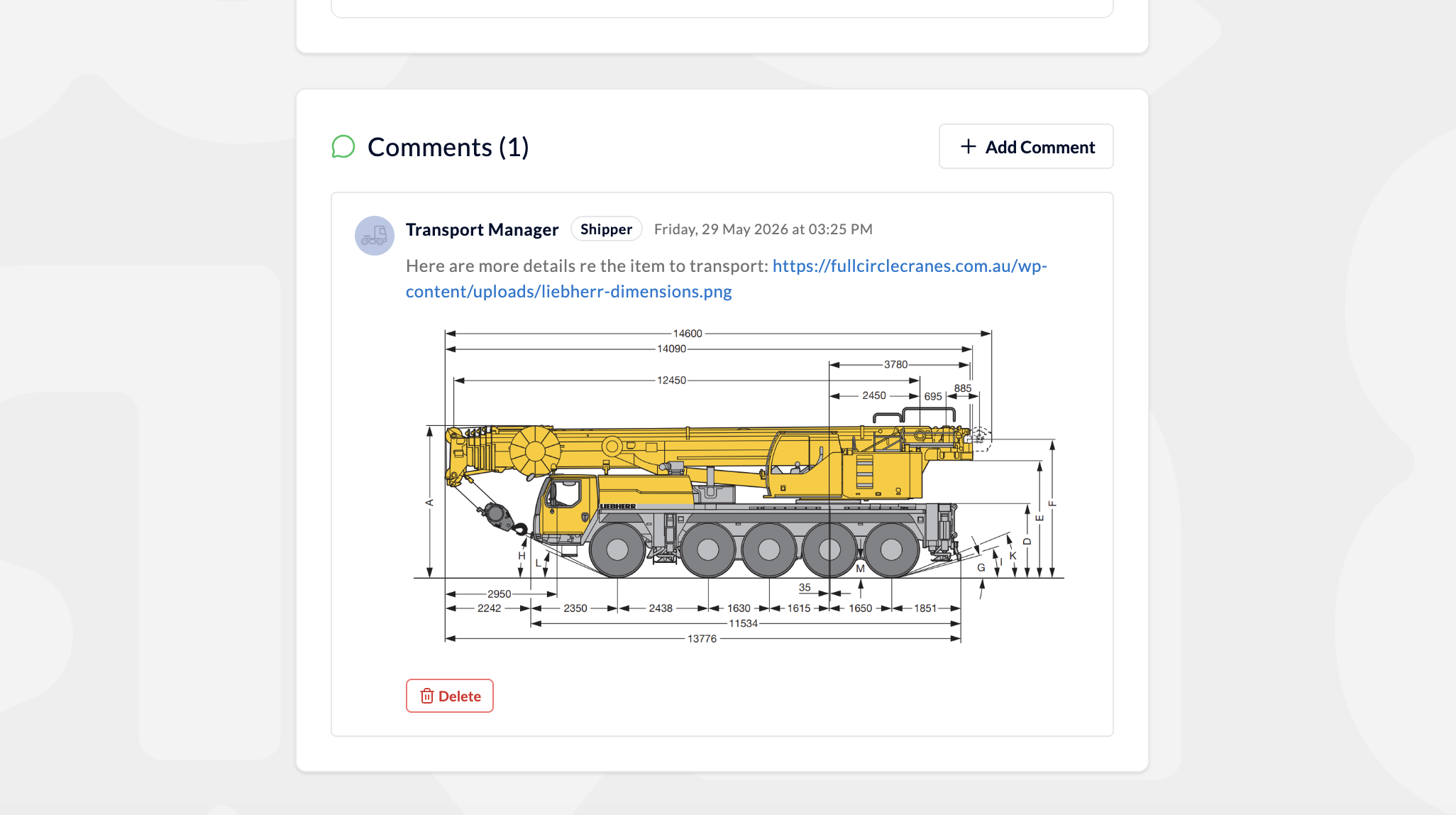
This is especially handy for larger or more unusual freight, where dimensions, access and handling all matter. Picture a job involving heavy or oversized equipment such as a crane. A photo link gives everyone the same picture of what is being carried, so the people quoting, dispatching and driving are all working from the same understanding.
The result is fewer assumptions, fewer follow up questions and a smoother run from quote through to delivery.
_
When you add or reply to a comment on a booking or quote request, you can now include a photo link alongside your message. Everyone with access to that booking can see the reference, keeping the relevant context in one place rather than scattered across emails and messages.
_
The feature is live for all users. Next time you are working through a quote or a booking with items that are tricky to describe in words, add a photo link and let the picture do the talking.
_