product updates27 May 2026
All your booking work, on one screen
Every section, every action — now in one scrollable view.
Every section, every action — now in one scrollable view.

Patrick Charriere
Product Manager · 5 min read
We've rebuilt the Booking Details Page.
Managing a booking on Blink used to mean jumping between tabs. Vehicles in one place. Comments in another. The activity log somewhere else. Integration data tucked behind a menu.
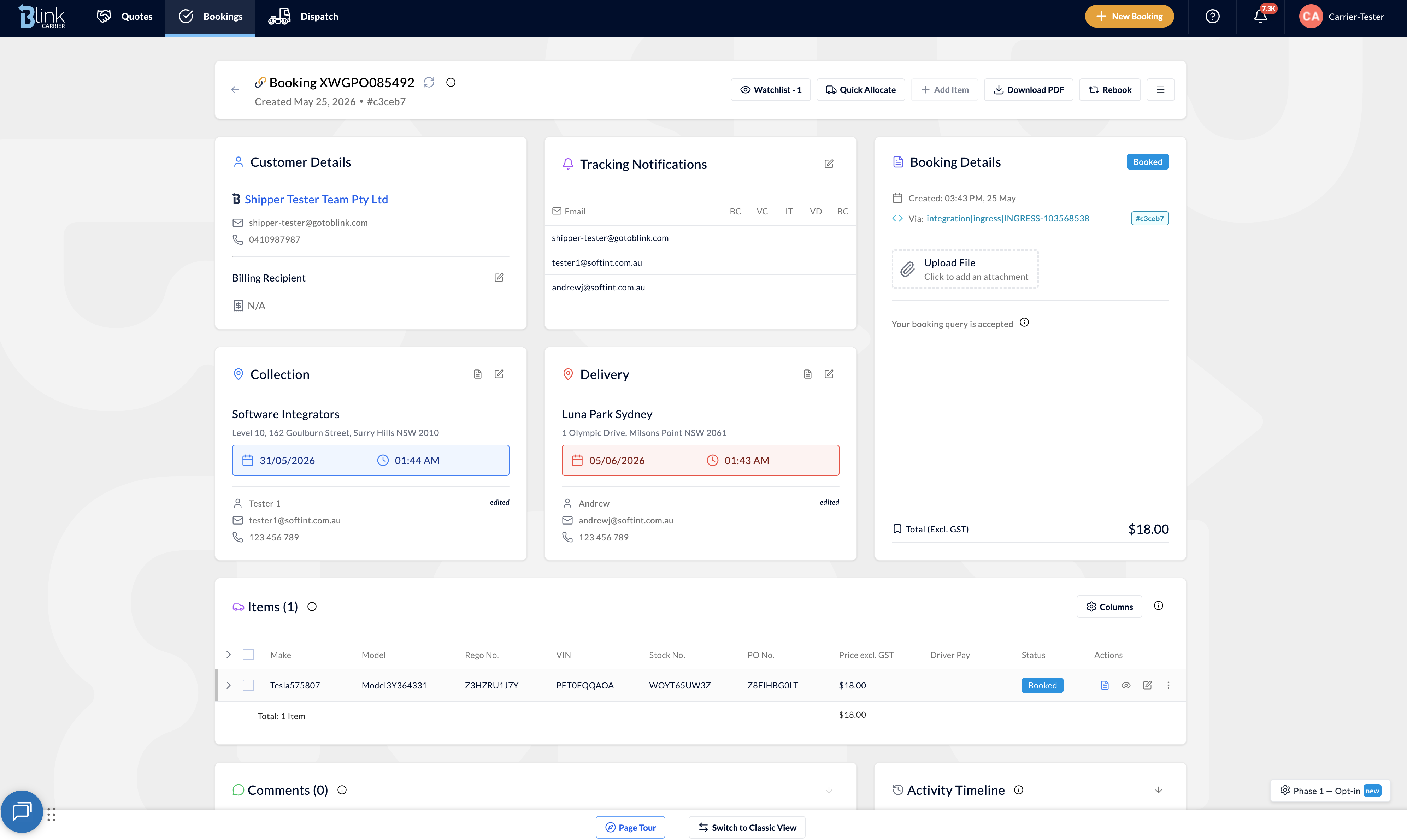
The new Booking Details Page brings everything onto a single scrollable screen, with a refreshed design built around the work you actually do, not the way the data happens to be modelled. Here is what is new.
Select multiple vehicles with checkboxes and edit shared fields (PO number, price, status) in one go. Allocate, complete or cancel several vehicles at once.
Tip: the action toolbar appears above the items table as soon as you select one or more rows.
Pick the columns that matter to you, reorder them by drag and drop, and your preference is saved for next time. Different dispatchers care about different fields, and now the table can finally reflect that.
Available columns include Make, Model, Rego No., VIN, Stock No., PO No., Price excl. GST, Driver Pay, and Status. Click the column settings icon at the top right of the items table to choose your layout.
Comments and the activity log now sit next to each other, both fully searchable. Comments also carry role tags so you can see who said what at a glance:
Every event is logged in the activity timeline. Use the search bar to find any change instantly. Try searching for "invoice" or "delivered" to see it in action.
Customer, route, items, financial summary, comments, activity, attachments, integrations. Every section now lives on one scrollable page. No tabs. No hidden menus.
The new top section gives you everything you need at a glance: header, customer details, tracking notifications, booking info, collection and delivery, all together. The vehicle items table sits below, with comments and the activity timeline at the bottom of the page.
Carriers can Accept, Negotiate or Reject a pending booking directly from the booking page. Shippers can Accept or Reject pending shipper bookings the same way.
No more digging into a separate workflow to action a request. The answer sits right inside the Booking Details card.
Open any booking and follow the prompt to try the new page. A built in product tour walks you through the highlights in about 30 seconds. If something feels off, use the feedback form here or live chat, we're listening.
Welcome to the new Booking Details Page.